Akadesk Primary and Akadesk Secondary

The school system your whole school will use.

Results, fees, staff, parents, AI Learning and your school website, in one system for primary and secondary schools.

₦2,000
from, per pupil a term
Free
staff accounts
EN · FR
two languages
The class timetable in the school app on a laptop, with sample lessons
A parent's view of a child's results on a phone
Why schools switch

One system instead of ten notebooks.

Most schools run on paper registers, result spreadsheets, a fees notebook and a dozen chat groups. Akadesk puts all of it in one place, and every record stays from term to term.

  • Paper registers in a teacher's bagWith AkadeskThe head sees this morning's attendance from the office.
  • Results typed into spreadsheets at midnightWith AkadeskScores roll into results, and report cards are ready to print.
  • Fees tracked in a notebookWith AkadeskInvoices, part payments and balances by term, with receipts.
  • Parents calling the office all dayWith AkadeskParents see results, attendance and fees on their phone.
AI Learning

A personal tutor for every pupil.

AI Learning works inside your school app, so pupils never sign in twice. These are real screens, with sample data.

  • AI Tutor that talks or types, writes on a whiteboard, and knows each pupil's results
  • AI-taught classes where pupils raise a hand and ask questions
  • Practice Questions for timed exam preparation
An AI-taught class: the teacher explains the quadratic formula on a whiteboard while pupils ask questions
The AI Tutor on a phone, solving a quadratic equation step by step with a graph
Who uses it

Everyone gets the screens they need.

Each person signs in to their own view. Roles and permissions are set by the school.

  • Proprietor

    Every school, one account

    • Run a primary and a secondary school, or many, from one sign-in
    • One invoice, with a discount for groups of schools
    • Fees, attendance and results across schools
  • Head teacher

    The whole school at a glance

    • Approve lesson notes and leave
    • See attendance, staff clock-ins and coverage
    • Add remarks and publish results
  • Teacher

    Less paperwork

    • Registers and scores, even on a phone
    • Schemes of work, lesson notes and class diary
    • Assignments, tests and live lessons
  • Bursar

    Every payment accounted for

    • Fee schedules, invoices and receipts
    • Part payments and balances by term
    • Payroll, salaries and payslips
  • Parent

    No more guessing

    • Results, attendance, homework and fees
    • Pay fees online
    • Message teachers and read announcements
  • Pupil and student

    School in their pocket

    • Timetable, assignments and results
    • Computer-based tests, live lessons and the AI Tutor
    • Their own ID card with a QR code
Real screens from the app

The same school, on a laptop and a phone.

Every screen works on a laptop, a tablet and a phone. These are taken from the app itself, with sample data.

Swipe for more screens

Report cards

Results parents trust, in your colours.

Real report cards made by the app, with behaviour and skills ratings and remarks from the class teacher and head. Your school picks a design and adds its logo and colours.

Rings · PrimaryStorybook · PrimarySidebar · Secondary

21 more designs to pick from: 10 more for Primary and 11 more for Secondary. Every one has a QR code that proves the result is genuine.

  • The Classic report card designClassicPrimary
  • The Bright report card designBrightPrimary
  • The Heritage report card designHeritagePrimary
  • The Progress report card designProgressPrimary
  • The Prestige report card designPrestigeSecondary
  • The Aurora report card designAuroraSecondary
  • The Statement report card designStatementSecondary
  • The Trend report card designTrendSecondary
ID cards

ID cards that prove themselves.

Cards for pupils, students and staff in your school's colours. Scan the QR code and your school website confirms the card is real. Staff cards also work at the gate for clock-in.

Student · GradientStaff · Midnight

12 designs for students and staff. Print a whole class at once, or let each person open their own card on their phone.

  • The Classic ID card design for studentClassicStudent
  • The Crest ID card design for staffCrestStaff
  • The Lanyard ID card design for studentLanyardStudent
  • The Wave ID card design for staffWaveStaff
  • The Split ID card design for studentSplitStudent
  • The Corner ID card design for staffCornerStaff
  • The Stripe ID card design for studentStripeStudent
  • The Bold ID card design for staffBoldStaff
For parents

Everything a parent asks the office, on their phone.

Your school's own app, with your name and logo, added to the phone's home screen. No app store, no extra download.

  • Results and report cards the day they are published
  • Attendance, homework and fees with online payment
  • Messages and announcements from the school
Every module

Everything a school runs on.

All of this is part of the one price per pupil. Nothing is locked behind a higher plan.

  • Admissions and records

    • Online applications with screening, offers and acceptance
    • Admission fees
    • One profile per pupil with guardians, health notes and documents
    • Promotion history from class to class
    • Pupils ask to change their name, phone or photo, and the school approves
    • Roll numbers in your own format
  • Classes and attendance

    • Classes with your own class level names
    • Arms and subject combinationsSecondary
    • Departments with their own headsSecondary
    • Timetable builder that flags clashes
    • Class registers with term attendance percentages
  • Assessment and results

    • Your own CA and exam weights, and grade scales
    • Each assessment sat online or on paper
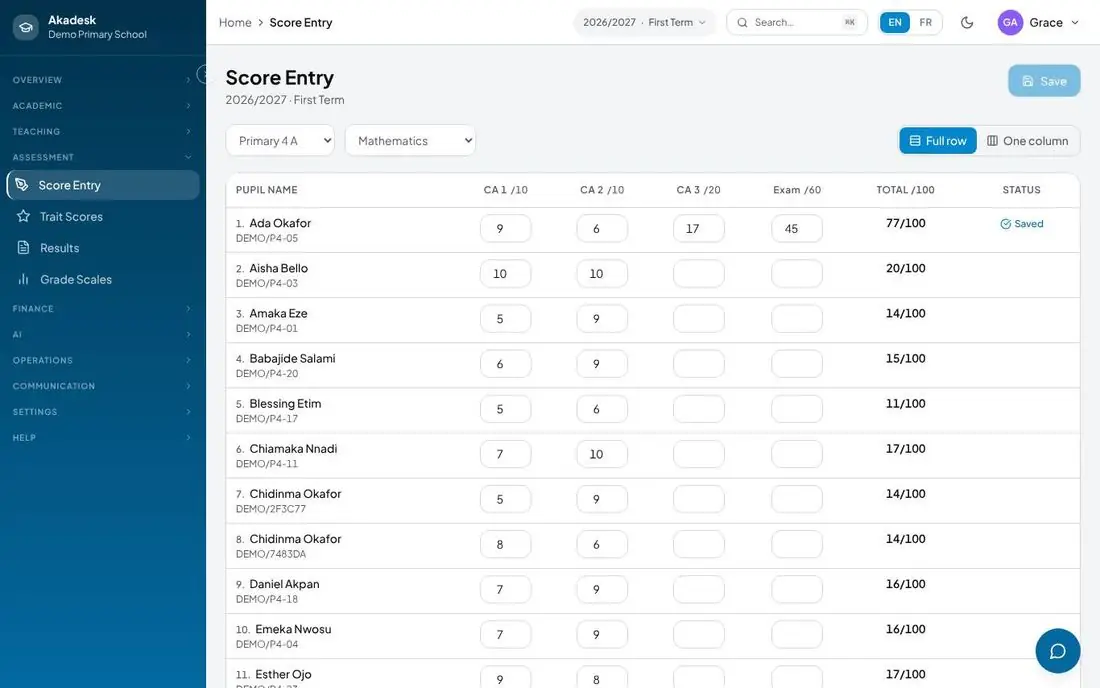
    • Score entry by subject, with a reason for any hand-typed mark
    • Behaviour and skills ratings
    • Report cards with remarks, many designs and QR verification
    • Class scores for form teachersSecondary
    • Results analysis, positions and final-year transcriptsSecondary
    • External exam entries, exam permits and result importSecondary
  • Fees and payments

    • Fee schedules per class
    • Invoices for a whole class at once
    • Part payments and balances by term
    • Online payment by parents
    • Receipts parents can download
  • Staff and payroll

    • Staff records, roles and permissions
    • Teaching assignments by subject and class
    • Leave requests and approval
    • Salaries, payroll runs and payslips
    • Clock-in by phone or at a gate tablet, with reports
    • Staff ID cards that also work at the gate
  • Teaching and learning

    • Schemes of work and syllabus coverage
    • Lesson notes with head teacher approval
    • Class diary and record of work
    • Course content and assignments
    • Question bank and computer-based tests
    • Live online lessons and online school
  • Parents and communication

    • Parent portal for results, attendance, homework and fees
    • Messages between parents and staff
    • School announcements
    • SMS alerts to parents
  • Your school website

    • Pages, news, gallery and slideshow
    • Testimonials and your own menus
    • Contact form with an inbox
    • Results checker
    • On your own domain, with a free address until then
  • Boarding and librarySecondary

    • Hostels and houses, with bed allocation
    • Roll call and exeats
    • Boarding reports and the parent's boarding view
    • Library books, loans and returns
  • ID cards

    • Student and staff ID cards in 12 designs
    • Your school's colours, photo and logo
    • A QR code that confirms the card is real
    • Print in batches or let people view their own card
  • AI Learning

    • AI Tutor for pupils, by voice or by typing
    • AI-taught classes with a whiteboard
    • Practice Questions for exam preparation
    • 300 minutes of AI help a month for your staff
  • Works everywhere

    • Your school's own app on any phone's home screen
    • Phones, tablets and laptops
    • English and French, chosen by each person
    • Help videos inside the app
Two schools, one system

Made for each kind of school.

Akadesk Primary

The way primary schools work.

Class teachers run their own class, and the head sees every class from one screen.

  • Class-teacher registers and score entry for every subject.
  • Report cards parents understand with behaviour and skills ratings.
  • A class diary and weekly lesson notes for the head to approve.
  • Messages between home and school and announcements every family sees.
  • Your own class names: Primary 1, Basic 1 or whatever your school uses.
primary.akadesk.com
Akadesk Secondary

Built for the size of a secondary school.

The parts a primary system was never built to hold.

  • Arms and subject combinations: each student carries the subjects their combination sets.
  • Departments: heads of department manage their own subjects, staff and scores.
  • Timetables that flag clashes while you are still placing periods.
  • Terminal, mock and external exams, with exam permits, results analysis and transcripts.
  • Class scores for form teachers: every subject for their class on one screen.
  • Boarding and library: hostels, roll call, exeats and book lending.
secondary.akadesk.com
Built for schools here

Made for how our schools really work.

Fees in instalments
Part payments and balances are normal, not an exception.
Weak connections
Registers and score entry retry instead of losing work.
Each school's data apart
Every record belongs to its own school, and people see only their role's screens.
English and French
Each person picks their language.
School carries on at home
Live lessons with attendance, computer-based tests whose marks go into results, and the AI Tutor any time.
Simple pricing

One price per pupil. Everything included.

From
₦2,000
per pupil, per term
  • Every module on this page, AI Learning included
  • Staff accounts free and unlimited
  • 300 minutes of AI help a month for your staff

Discounts for schools with 500 pupils or more, and for groups of schools.

Also from Akadesk

More ways to help pupils learn.

Akadesk Practice
Timed past-question practice for exams.
EduConnect
Live and recorded extra lessons from teachers.
SMS alerts
Text messages to parents, for schools that switch them on.
Questions

What schools usually ask.

Can we run more than one school?

Yes. Each school keeps its own pupils, staff and fees, and the proprietor sees all of them from one account. Groups of schools get a discount.

Do parents need to download an app?

No. Parents sign in on the school's site with the phone number or email the school registered, and can add the school's app to their phone's home screen.

How do we move from our current records?

Import your pupil list from a spreadsheet. We help you set up classes, terms and fees during the demo.

What happens at the end of a term?

Scores close, report cards are made, and pupils carry forward. Last term's records stay readable.

Does it work with a weak connection?

Registers and score entry are the screens teachers use most, and both retry on a slow link instead of losing the entry.

Can we use our own website address?

Yes. Point your domain at us and your school site serves from it, with a security certificate set up automatically.

Who pays for staff accounts?

Nobody. You pay per pupil, per term, from ₦2,000. Staff accounts are free and unlimited, and schools with 500 pupils or more get a discount.

Getting started

Up and running in three steps.

  1. Set up your school

    Classes, terms and fees. Bring in your pupil list from a spreadsheet.

  2. Invite your staff

    Teachers, the bursar and the head each get their own sign-in.

  3. Open it to parents

    Parents sign in to see results, attendance and fees.

See it for yourself

Book a free demo, with your school's name on it.

We set up a trial school for you and walk your team through it, at your school or online.

Phone
+234 806 003 3575 call or WhatsApp
For schools — Akadesk Academic OS